Your notes stay on your Mac and iPhone, in your hands.
Local-first Markdown notes for Mac and iPhone: encrypted sync, search by meaning on your device, AI edits you review.
macOS 15+ on Apple Silicon or Intel · iOS 26+
Signed and notarised by Apple, so it opens like any Mac app. Install steps

What sets Devot apart
Four things that come with the one licence, with nothing to subscribe to and nothing to trust blindly.
SyncEnd-to-end encrypted sync, no subscription.
Each note is sealed with AES-256-GCM on your device before it leaves, then travels through your own iCloud or a relay you deploy. Neither can read it, and the licence you buy once covers sync for good.
SearchSearch by meaning, on your device.
Related by Meaning finds notes that say what you searched for in other words. A language model built into the system reads them on your device, in seven languages, so it works offline and no note leaves for it.
AIAI edits you review change by change.
Edit with AI shows its proposal as a diff and applies only the changes you tick. When an AI tool writes over MCP, Devot marks what it changed and lets you keep or undo each edit. Bring a key from your own provider.
SourceSource you can read and build.
Every line of Devot is public under FSL-1.1-MIT. Check how your notes are stored and encrypted, or build the app yourself.
Write it down. Keep it in order. Find it again.
Three things a notes app has to get right, in one calm window on your Mac.

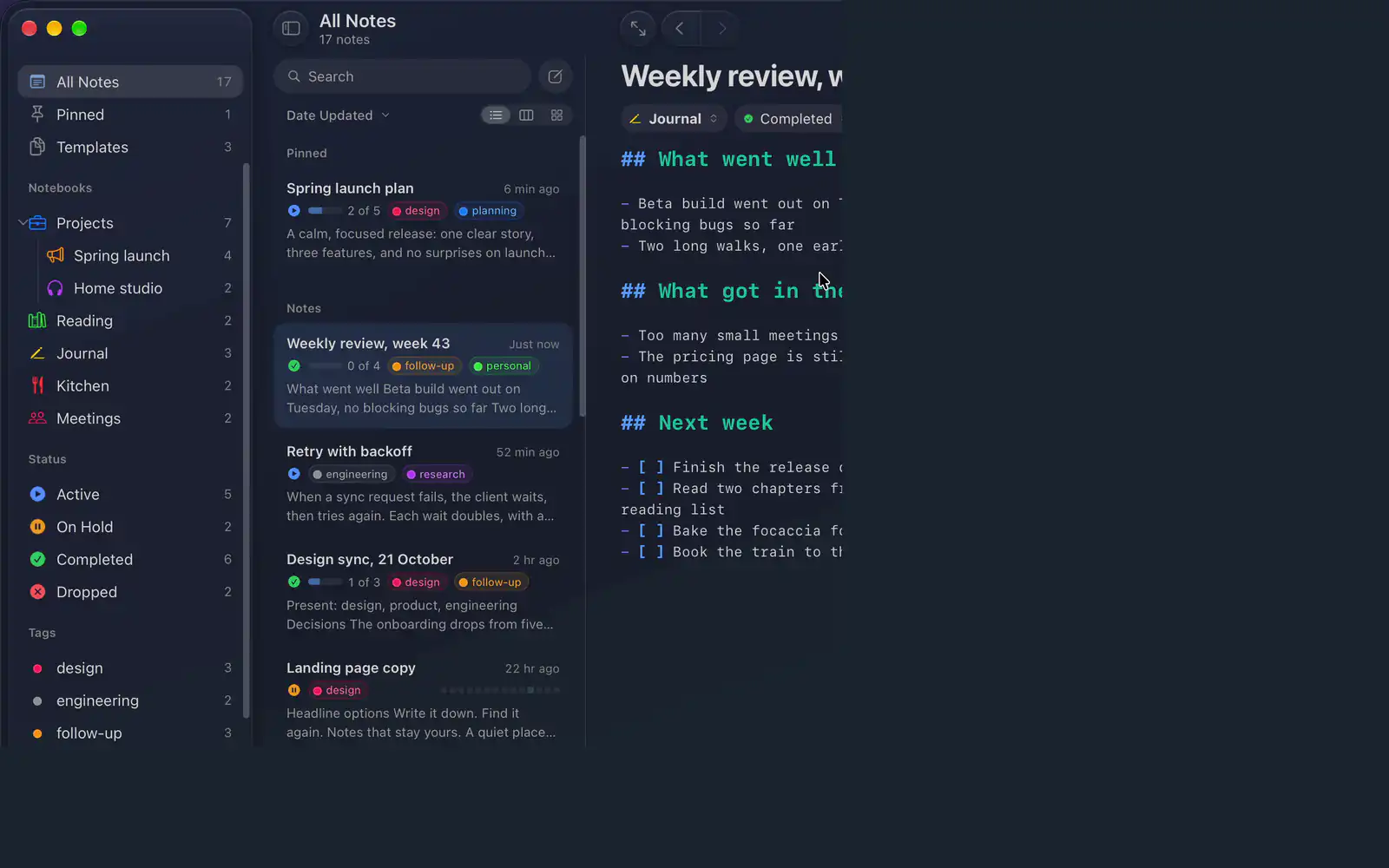
WriteMarkdown on one side, the finished page on the other.
Type plain Markdown and the live preview keeps pace, scrolling with you. Code is highlighted, and maths and Mermaid diagrams render as you write. Focus Mode hides the sidebar and the list, leaving only the note.

OrganiseEvery note in its place, and you know where it stands.
Nest notebooks inside notebooks, each with its own icon, and give your tags colours. Mark a note Active, On Hold, Completed or Dropped, or leave it without one: the list shows each status, and the sidebar filters by it.
Try it
Filter by status
Pick a status, as in the sidebar, and the list keeps only its notes. Pick it again to see them all.
All Notes
Same as searching
- Spring launch plan Active Spring launch
- Landing page copy On Hold Spring launch
- Retry with backoff Active Projects
- Design sync, 21 October Completed Meetings
- Studio acoustics On Hold Home studio
- Morning pages No Status Journal
- Pricing experiments Dropped Spring launch
- Rosemary focaccia Completed Kitchen
- Reading list Active Reading

Find and connectAny note, a few keystrokes away.
Search every word, then narrow it down with book:, tag: or status:, or rule things out with a minus. Type [[ to link one note to another, and the other note lists it under “Backlinks”.
Small details, close at hand
The tools you reach for every day, a keystroke or a click away and out of sight the rest of the time.
Four gradients, light or dark.
Tint the window with Dawn, Tide, Sage or Ember, four gradient themes that come in light and dark and can follow your Mac.

Just the note, nothing else.
One keystroke hides the sidebar and the note list, so only the note you are writing stays on screen.

Tables that keep their shape.
Tab moves between cells and shortcuts add, move and align rows and columns, so a Markdown table stays tidy as it grows.

Every command, a few keys away.
Type a few letters to find any command, notebook, tag or note, and change most shortcuts to the keys you prefer.

Go back to an earlier version.
Devot saves a version when you pause typing for a minute and keeps every one for a day, then hourly for a week, then daily.

Notes that start filled in.
Start a note from a template that sets its notebook, tags and status, and fills in placeholders such as
{{date}}and{{title}}.


New in Devot 1.1, on the Mac and the iPhone.
Write mode
The note renders as you write, and shows the Markdown only of the element under the caret.
Gallery and board
See a notebook as page previews, or as a board by status with each card's task progress.
Saved searches
Keep a search in the sidebar. It still works after you rename a tag.
Sync through iCloud
Your notes travel through your own iCloud, sealed with Devot's key before they leave.
Outline and counts
An outline beside the editor, and words and characters in the corner.
More diagrams
PlantUML diagrams and Markmap mind maps render on your Mac, beside Mermaid.
Pick up where you left off.
The same notes and the same editor on your iPhone, with the tabs, search, sheets and swipes of an iPhone app. Write offline; it syncs when it can.
Through your iCloud, sealed by Devot
Each note is encrypted on your device before it leaves, so iCloud stores what it cannot read. A relay you deploy works the same way.
Joins without a code
Devices on your Apple ID receive the key through iCloud Keychain. Remove one, and a new key locks it out.
Buy once, on either
A Mac licence unlocks the iPhone, and an iPhone purchase brings a Mac licence key.
iPhone, iOS 26+
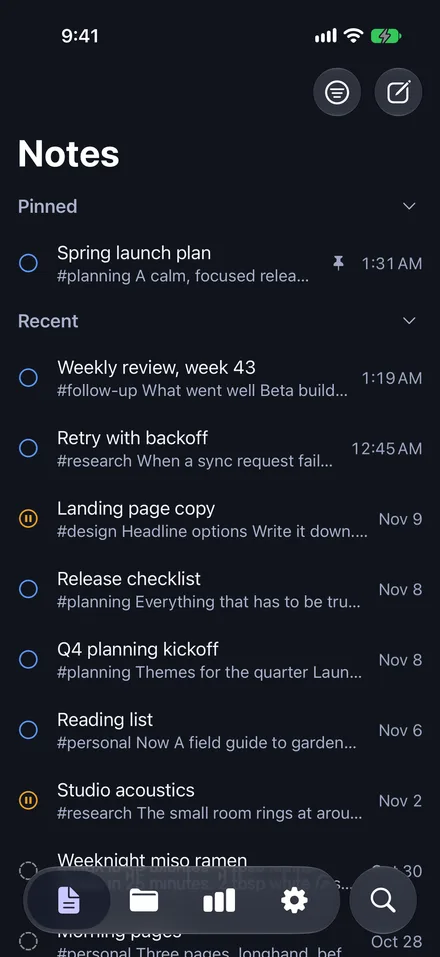
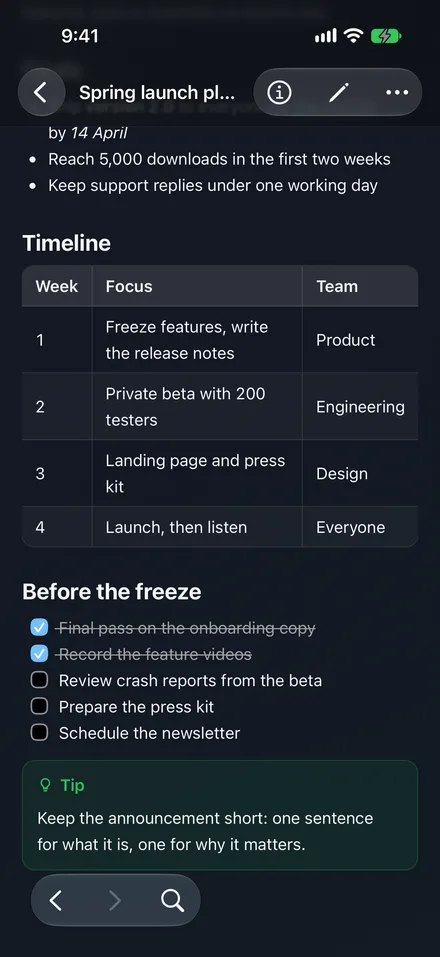
Your notes live on your devices.
- Stored on your devices
- No account needed
- Works offline
- Plain Markdown export
- Version history on your Mac
- Source available, FSL-1.1-MIT
- Daily local backups
Plain Markdown files, once the mirror is on.
Devot keeps your notes in a SQLite database in your Library folder, and needs no account or connection to write, search, back up or export. A mirror folder also holds every note as a Markdown file, and with Bring Back Outside Edits on, files you change in other apps go back into their notes.
What does Devot send over the network?
- Update checks
- Release builds ask GitHub for the update feed 30 seconds after launch, then daily (hourly for betas).
- Link titles
- A page title or GitHub snippet is fetched only when you highlight or pick a paste format that needs one.
- Embeds and web images
- YouTube and Vimeo embeds load only when you ask. Images you link by https load as written.
- Crash reports
- Off until you turn them on in Settings > General. They carry error codes and code locations, never note text.
- Sync
- Notes travel end-to-end encrypted, through your iCloud or a relay you deploy. Neither can read them.
- AI
- Note text goes to the provider whose key you added, and only when you use AI.
Your note text goes nowhere unless you export it, mirror it, sync it through your iCloud or your relay, send it to your AI provider or let an MCP client read it.
30 days with everything. Then pay once.
Open Devot and the trial starts, with editing, sync and AI included. After it, one purchase unlocks everything for good, on the Mac and the iPhone.
Trial
30 days
A free trial with everything included. It starts the first time you open Devot.
- Writing, notebooks, tags and search
- End-to-end encrypted sync, through your iCloud or a relay you deploy
- AI with keys from your own provider
- Version history, backups and Markdown export
macOS 15+ on Apple Silicon or Intel · iOS 26+
Licence
US$29.90
One payment, tax included. No subscription, no renewal.
- Everything in the trial, for good
- Every future version of Devot
- Up to three devices at a time, Mac or iPhone
- No account needed
30-day refund, no questions asked.
On the iPhone
Devot for iPhone is in the App Store, with the same trial. Devot Pro unlocks it there for US$29.99, once. A Mac licence unlocks the iPhone too, and an iPhone purchase brings a Mac licence key.
When the trial ends
Without a licence, Devot turns read-only: you can still read, search, copy and export every note, but not create or edit one, and sync and AI stop. Nothing is deleted, and export always works. Add a licence and everything unlocks again.
Rather not pay?
The source is public. Build Devot from it yourself and every feature works without a licence, under FSL-1.1-MIT, as long as you do not sell it or offer it as a competing product. The licence pays for the signed app, automatic updates and the work on Devot. How to build Devot
After paying, your key shows on the page and arrives by email, with a link that opens it in Devot. Payments are processed by Stripe through Stripe Managed Payments, a merchant of record service.
Write on your Mac and iPhone. Keep what you write.
A 30-day free trial, everything included. Source available under FSL-1.1-MIT.
macOS 15+ on Apple Silicon or Intel · iOS 26+
Signed and notarised by Apple, so it opens like any Mac app. Install steps
Updates arrive in the app, so you install it once.